
An LED display incident report template should capture what users saw, when it happened, which area and equipment were affected, what evidence was preserved, which actions were taken, and who owns the next decision. A useful report separates observed facts from suspected causes so the support team can diagnose the event without rebuilding the timeline from messages, memory, and incomplete screenshots.
The report is not a repair manual or a substitute for an emergency procedure. Safety and the site’s approved response come first. Once the situation is stable, consistent evidence helps the customer, integrator, manufacturer, and service provider compare the incident with the installed configuration and decide whether the display can remain in service, operate in a degraded mode, or needs planned intervention.
What should an LED display incident report include?
Direct answer: record the site and display identity, reporter, local time and timezone, first observed condition, visible impact, affected physical area, content and source in use, device and alert states, recent changes, photos or video, exported logs, actions and approvals, current service status, escalation owner, and the next review time. Give every attachment a clear filename and link it to the relevant device or timeline entry.
Use one report ID across the incident log, service ticket, attachments, emails, and replacement records. That simple connection makes later warranty, trend, and root-cause reviews far more reliable.
Copyable LED display incident report template
On smaller screens, swipe horizontally to view all columns.
| Report section | Fields to record | Useful evidence | Owner |
|---|---|---|---|
| Identification | Report ID, site, display name, physical location, asset or cabinet map reference | As-built drawing or approved equipment inventory | Site operator |
| Observation | Local time, timezone, reporter, exact visible symptom, first known occurrence | Full-wall photo, detail photo, short video, witness note | First observer |
| Operational impact | Service unavailable, partial image loss, degraded operation, intermittent issue, or no visible impact | Required use at the time and current display state | Business owner |
| System evidence | Source, processor, controller, receiving chain, power, network, environment, and monitoring state | Exported logs, alarm history, version list, status captures | Technical lead |
| Actions | Action, exact time, person, approval, observed result, and any configuration or component changed | Before-and-after evidence and change record | Change lead |
| Handoff and closure | Current status, escalation owner, next review, service ticket, root-cause status, closure approval | Acceptance check, repair record, lessons and follow-up tasks | Service owner |
This table is the minimum structure. Add project-specific fields only when someone will use them to make a decision. A form with dozens of empty technical fields can discourage timely reporting; a short form with no evidence fields creates an unusable ticket.
Separate an incident, an alert, and a root-cause report
An alert is a system-generated or operator-observed indication. An incident is an event that affects—or could affect—the required display service and needs coordinated attention. A service ticket assigns work. A root-cause report explains the verified cause after investigation. These records can reference one another, but they should not be treated as the same thing.
For example, a controller communication alarm may occur without a visible service impact. It still deserves a record if it changes redundancy or repeats, but the incident report should not claim that the alarm caused an image fault unless evidence supports that conclusion. The LED display remote monitoring checklist explains how to connect alerts to named owners and verification actions.
Record observable facts before proposing a cause
A strong LED wall fault report describes the symptom in physical and operational terms: the complete canvas was blank, one mapped cabinet area was dark, part of the image froze, colors changed in a defined region, content was cropped, or communication became intermittent. Record whether the symptom was continuous or intermittent and whether it affected all sources or only one route.
Avoid writing “bad receiving card,” “power failure,” or “software bug” as the first observation unless the component has been tested. Those statements are hypotheses. Use separate fields for observed condition, suspected cause, tests performed, and verified cause. This distinction prevents a guess from becoming an accepted fact as the report moves between teams.
Preserve the first useful evidence
Follow the approved safety and recovery procedure first. When it is safe and permitted, preserve evidence before resets, cable changes, configuration uploads, or component swaps alter the state. Record the local time and timezone, current content or test source, operating mode, visible symptom, active alerts, and any recent maintenance or environmental event.
- Take one full-wall image that shows the fault’s position within the complete canvas.
- Take a closer image that shows the affected cabinet or module boundary without losing orientation.
- Record a short video for intermittent, flickering, motion, synchronization, or transition problems.
- Capture the input and processor state where the approved tools expose it.
- Export monitoring and device logs in their original format when possible.
- Write down what happened immediately before the observation, including authorized changes and normal operating transitions.
- Preserve original files; work from copies when adding notes, crops, or annotations.
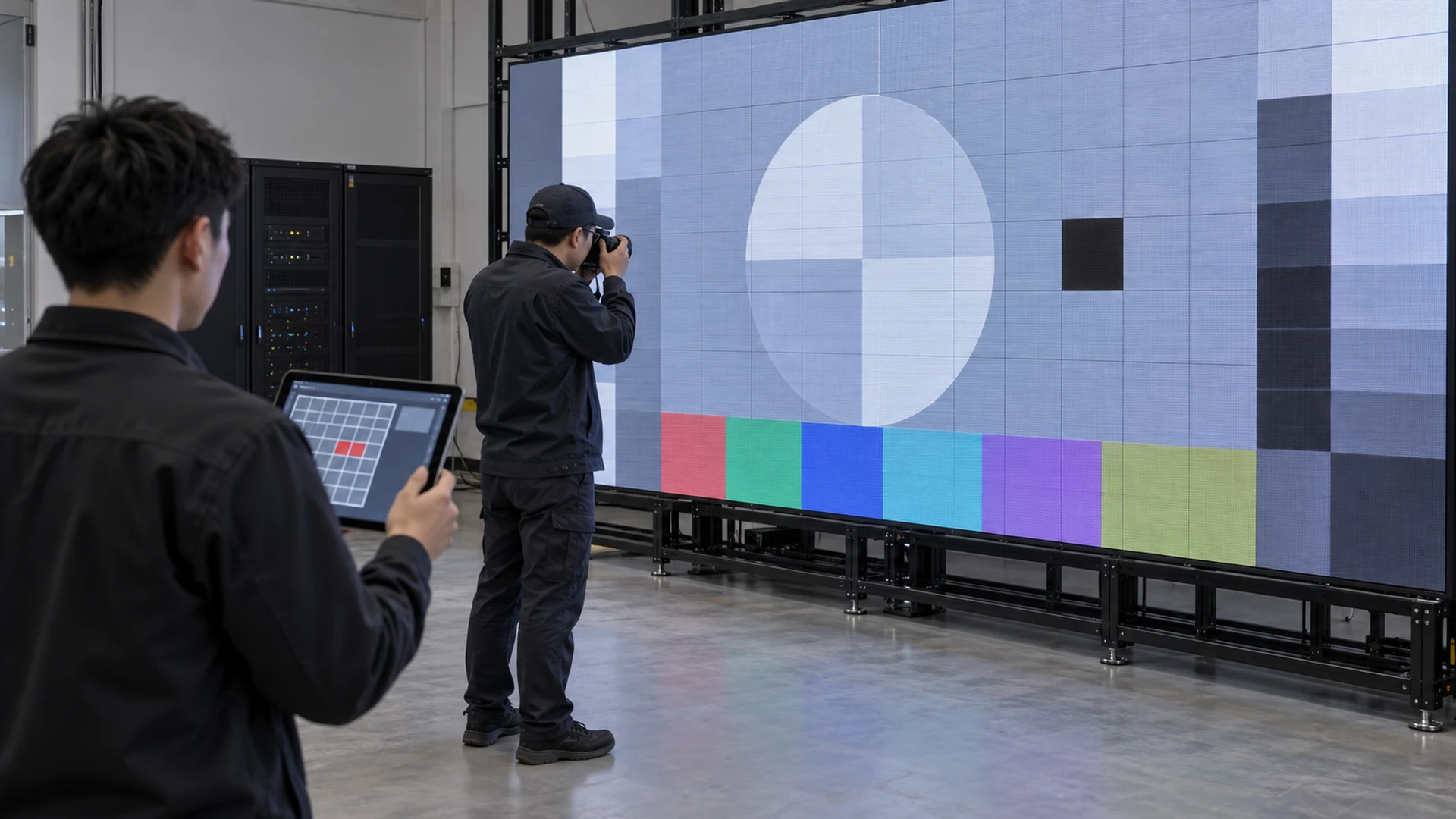
How should photos and video be captured?
Photographs are evidence only when the viewer can identify what they show. Start wide, then move closer. Include a stable reference such as the full canvas, a known cabinet boundary, or the approved map. Keep the camera level enough that panel relationships remain clear. If the screen content itself is confidential, follow the customer’s information-handling policy and use an approved test pattern when the operating condition allows it.
Camera exposure can create bands, moiré, or color differences that were not visible to the eye. Note whether an artifact appeared in person, in the recording, or both. For camera-specific problems, preserve the camera model, frame rate, shutter setting, signal path, and content conditions used during the observation rather than relying on an isolated photo.
Collect system evidence by layer
An LED display failure evidence package should follow the signal and power path instead of collecting random screenshots. Begin with the content source and selected route, then record processor input and output state, controller communication, receiving-device map, redundancy state, power and distribution information where instrumented, network reachability, environmental readings from identified sensors, and current alarms.
State whether each value is directly measured, reported by a device, inferred from another condition, or confirmed visually. “Online” may prove network communication but not correct image output. A room temperature sensor does not prove every cabinet’s internal condition. These limits belong in the report so later analysis does not give the evidence more certainty than it has.
Record software and firmware versions only when they are relevant and can be read without disrupting service. If an update or configuration change occurred near the incident, reference the controlled change record and the previous accepted baseline in the firmware update plan.
Build a single incident timeline
A useful LED screen incident log places observations, alerts, calls, approvals, actions, and results on one timeline. Use the local site time and include the timezone. If platforms use different clocks, record the offset or source rather than silently adjusting timestamps. Preserve the original time in exported records.
Each action entry should answer five questions: who acted, what they did, when they did it, who approved it, and what changed afterward. Include unsuccessful actions; they narrow the diagnosis and prevent another technician from repeating work that may alter evidence. Do not edit earlier entries to make the final explanation look cleaner—add a correction with its own time and author.
Classify impact without overstating severity
Severity should reflect the agreed business and safety impact, not how unusual the symptom looks. Useful categories can distinguish complete loss of a required display, partial loss that prevents required content, degraded but usable operation, loss of redundancy, an intermittent condition, and an informational event with no current visible impact. Adapt the labels to the customer’s service framework.
Record the required use at the time: a meeting, control function, broadcast, public information duty, retail campaign, rehearsal, or idle period can create different consequences. The LED display maintenance SLA should define response and escalation commitments; the incident report supplies the evidence needed to apply them.
Document temporary actions and configuration changes
Temporary recovery actions can become permanent risks when they are not recorded. For every source switch, redundancy override, restart, brightness change, configuration upload, component bypass, spare installation, or access-session change, record the person, approval, time, reason, result, and restoration requirement. Attach before-and-after configuration evidence when the system supports it.
If the team follows the black-screen recovery plan, link to the exact step used rather than rewriting it from memory. If a module is replaced, update the incident record with the new component identity and reference the module replacement documentation. The incident remains open until any temporary mode is restored, accepted, or formally transferred to another owner.
Package the report for an efficient service handoff
An LED display service ticket checklist should give the next team enough context to act without asking for the same basics again. Include the report ID, site contact, safe access window, current service state, impact classification, clear symptom, affected area, system inventory reference, timeline, evidence index, recent changes, actions already tried, temporary configuration, and the decision or support requested.
Do not send passwords, reusable access credentials, or unrelated customer data inside the report. Use the organization’s approved secure-access method and name the person who can authorize a session. If warranty review may be needed, preserve original evidence and service records, then compare the request with the documented coverage and exclusions. The warranty and support evaluation guide provides buyer questions for that review.
Close the incident only after service is accepted
Technical recovery and incident closure are not always the same moment. Confirm the visible image, required content routes, operator controls, monitoring, redundancy, and any functions affected by the work. Record who accepted the return to service, which tests were completed, which limitations remain, and who owns follow-up actions.
Keep root-cause status explicit: unconfirmed, under investigation, probable with evidence, or verified. A replaced part that restores service does not automatically prove why the part failed. Update the as-built documentation when the accepted system configuration or asset inventory changes, and preserve the incident record for trend review.
Questions about LED display incident reports
Who should complete the first report?
The first observer should record the visible condition, time, location, and immediate operational impact. A qualified technical owner can add device evidence and diagnostic results later. The original observation should remain identifiable rather than being overwritten by the final technical explanation.
Should the operator restart the display before taking photos?
Follow the approved safety and recovery procedure. If there is no urgent safety or service instruction and evidence capture is permitted, record the visible condition and active alerts before a restart changes the system state. Operators should not delay required protective action merely to complete a report.
What if the fault disappears before support arrives?
Keep the incident open according to the service policy and preserve photos, video, logs, time, source, environmental context, and recent changes. Intermittent incidents often require a pattern across multiple events, so consistent records are more useful than one late inspection.
Can monitoring data replace a visual incident report?
No. Monitoring can provide valuable timestamps and device states, but an online status does not always prove that correct content was visible. Combine telemetry with an operator observation or authorized visual check and state the limits of each evidence source.
When is an incident ready for root-cause review?
Begin formal review when the service is stable and the evidence package includes a reliable timeline, installed-system reference, actions and results, relevant logs, and identified gaps. If evidence is missing, record the limitation instead of filling it with assumptions.
Make every incident easier to diagnose than the last
A consistent LED display incident report template turns a stressful fault into structured evidence. It preserves the first observation, connects the physical wall to system records, separates facts from hypotheses, and gives every action a time and owner. Over time, those reports also reveal recurring components, operating conditions, gaps in monitoring, and procedures that need improvement.
KSSdisplay can help project teams define the asset map, evidence fields, escalation path, recovery links, spare records, and acceptance checks that belong in a support-ready display package. Review the available support resources or contact KSSdisplay with the application, display location, system configuration, required operating hours, and current service concern.




